Standard Business Card Size & Dimensions Guide (2026)
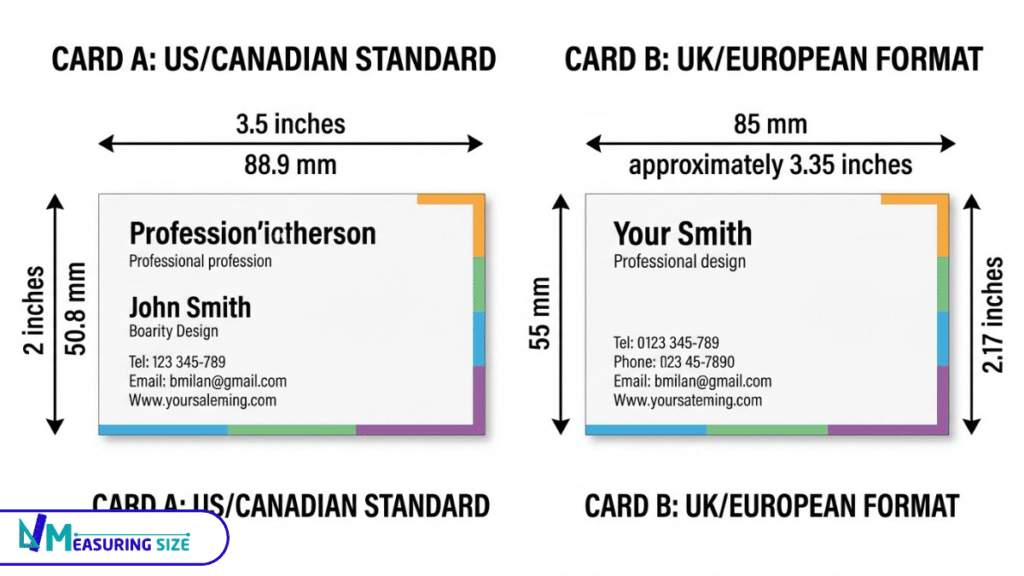
Business cards vary by country and design format. In the US and Canada, a standard business card measures 3.5 × 2 inches (88.9 × 50.8 mm), while the commonly used UK and European size is 85 × 55 mm (3.35 × 2.17 inches).
This guide covers standard business card sizes, regional differences, alternative formats, and the print dimensions you need to prepare artwork correctly.
What Are the Standard Business Card Sizes?
Common business cards vary by region:
- US and Canada: 3.5 × 2 inches (88.9 × 50.8 mm; 8.89 × 5.08 cm)
- UK and much of Europe: 85 × 55 mm (8.5 × 5.5 cm; approximately 3.35 × 2.17 inches)
- Japan: 91 × 55 mm (9.1 × 5.5 cm; approximately 3.58 × 2.17 inches)
There is no single size used worldwide. The best choice depends on where you plan to distribute your cards and which dimensions your printer supports. Confirm the finished size before preparing your design.
What are the Standard Sizes of Business Cards in Inches, MM, CM, and Pixels
Business cards are commonly listed in inches, millimetres, centimetres, and pixels. Physical measurements describe the finished card, while pixel dimensions depend on the resolution used for the design.
| Region | Finished size | Millimetres | Centimetres | Pixels at 300 DPI |
|---|---|---|---|---|
| US and Canada | 3.5 × 2 in | 88.9 × 50.8 mm | 8.89 × 5.08 cm | 1050 × 600 px |
| UK and Europe | 85 × 55 mm | 85 × 55 mm | 8.5 × 5.5 cm | Approximately 1004 × 650 px |
| Japan | 91 × 55 mm | 91 × 55 mm | 9.1 × 5.5 cm | Approximately 1075 × 650 px |
Pixel values are calculated at 300 pixels per inch and rounded to whole pixels. They represent the finished card dimensions, not the artwork file with bleed.
If your printer requires a bleed, extend the artwork beyond the finished trim dimensions. The amount to add depends on the printer’s specifications, so check its template before exporting your file.
Business Card Dimensions by Country and Region
US and Canadian Business Card Dimensions
When it comes to business cards, the standard card dimensions in the U.S. and Canada are typically 3.5 × 2 inches, which translates to 88.9 × 50.8 mm or 8.89 × 5.08 cm. These measurements represent the finished size of the card, so any design you create should not include extra bleed unless specified by your printer.
Here’s a quick bullet list of the measurements for clarity:
- Inches: 3.5 × 2
- Millimetres: 88.9 × 50.8
- Centimetres: 8.89 × 5.08
It’s important to remember that individual printers may have different requirements for artwork. Always check with your printer to ensure your design meets their specifications.
What is the Size of a UK and European Business Card?
The commonly used UK card size is 85 × 55 mm. In centimetres, this translates to 8.5 × 5.5 cm, and in inches, it’s about 3.35 × 2.17 inches. This size is a perfect fit for wallets and cardholders, making it easy for potential clients to keep your contact information handy.
When designing your card, remember that the 85 × 55 mm measurement refers to the finished size, excluding any bleed. Bleed is the extra area that allows for trimmed edges, so ensure your artwork accommodates for this. Always check local printer specifications because different printers may have varying requirements.
Here are some quick tips for preparing your business card:
- Use clear, legible fonts.
- Keep essential information bold and concise.
- Incorporate brand colors strategically.
By following these guidelines, you can create an eye-catching card that truly represents your brand.
Japanese Card Size Dimensions
The commonly used Japanese card dimensions are 91 × 55 mm, which converts to approximately 9.1 × 5.5 cm or about 3.6 × 2.2 inches. This size is favoured in Japan for its compactness and ease of handling, allowing for a professional presentation during introductions.
It’s important to remember that regional formats can vary. Different areas or print providers may have their own templates or preferences. Always check the selected print provider’s guidelines before placing your order.
Explore: How Big Is a Pokémon Card? Standard Size & Dimensions
Different Business Card and Shapes
Standard Business Card Size
Standard rectangular business cards are widely used because they are easy to carry and fit many wallets and cardholders. The usual landscape format measures 3.5 × 2 inches in the US and Canada, or 85 × 55 mm in the UK and much of Europe.
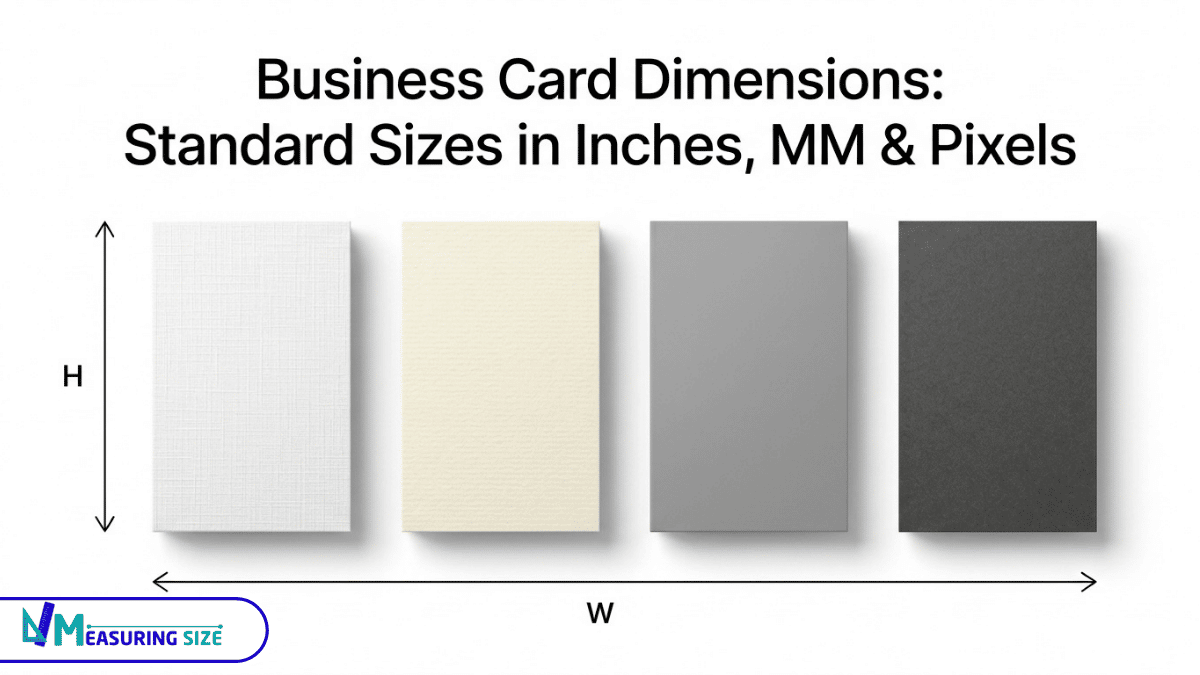
A portrait card uses the same dimensions turned vertically. Before ordering, confirm the finished size with your printer, especially if you plan to use a nonstandard format.
Square Size of a Business Card
Square business cards are unique because they have equal width and height, setting them apart from standard rectangular cards. For example, a size of 2.5 × 2.5 inches (63.5 × 63.5 mm) gives a modern look that can catch attention. This dimension highlights creativity and can make your card memorable.
Here are a few things to keep in mind:
- Varied Sizes: Different printers offer various sizes, so check what they provide.
- Artwork Considerations: Square cards often require different artwork dimensions and bleed settings compared to rectangular ones.
- Visual Appeal: Their shape can give a fresh twist to networking events and help you stand out.
Mini Business Card Size
Mini business cards offer a unique and compact alternative to standard business cards, standing out with their smaller size. Unlike the typical 3.5 x 2 inches of a standard card, mini cards can vary greatly, with common sizes like 2.75 x 1.1 inches or 3 x 1.5 inches.
Before printing, it’s essential to check both the final size and the artwork requirements. Here are key points to consider:
- Size Variety: Mini cards can differ widely, often providing flexibility for creative designs.
- Printer Specifications: Always confirm the exact size with your chosen printer, as they may have specific sizes available.
- Artwork Requirements: Ensure your design fits within the defined dimensions to avoid any cropping issues.
Long Size of a Business Card
Slim business cards are a narrower alternative to standard rectangular cards. One example offered by some printers measures 3.5 × 1.5 inches (88.9 × 38.1 mm), although available sizes vary by provider.
Their elongated shape can suit simple layouts with a name, contact details, and a logo. However, the smaller height limits the available design space. Check the printer’s finished dimensions and artwork template before creating a slim business card.
Folded and Custom Card Sizes
When choosing between folded business cards and custom-shaped cards, it’s essential to understand their differences. Folded cards start as a flat piece but transform into a smaller finished size once folded.
Before printing, keep these key checks in mind:
- Finished dimensions: Know the size after folding for folded cards or the final shape for custom cards.
- Open dimensions: Measure the flat size of your folded card before it’s turned into its finished form.
- Fold position: Ensure the fold is where you intend, as it impacts the overall design.
- Bleed: This is crucial for avoiding white edges on the final print; verify your design extends to the bleed area.
- Printer’s template: Always check the printer’s guidelines to ensure your design fits their specifications.
Sizes of a Business Card With Bleed and Safe Area
When preparing a business card for printing, distinguish between three measurements:
- Finished size: The dimensions of the card after trimming.
- Bleed: Extra artwork extending beyond the trim line to help prevent unprinted edges after cutting.
- Safe area: The inner area where important text, logos, and contact details should remain clear of the trim.
Bleed and safe-area requirements vary by printer and product. Use the print provider’s template rather than assuming every business card follows the same specifications.
What Is the Standard Business Card Bleed Size?
Bleed is the extra artwork that extends beyond the finished card’s trim line. It allows small cutting variations without leaving unwanted white edges.
For example, if a printer requests ⅛ inch (0.125 inches) of bleed on every side of a US business card, the dimensions would be:
- Finished size: 3.5 × 2 inches
- Bleed: 0.125 inches on each edge
- Artwork size with bleed: 3.75 × 2.25 inches
The extra 0.25 inches is added to both the width and height because bleed extends on two opposite sides of each dimension. Always confirm the required bleed with your printer before preparing the final artwork.
What Is the Safe Area for a Business Card?
When designing a business card, understanding the business card safe area is crucial. This area acts as a protective margin that ensures essential details like your name, contact information, and logo don’t get cut off during printing.
It’s important to distinguish between the safe area, bleed, and trim edges. Here’s how to think about it:
- Safe Area: Keep all vital text and graphics within this zone to avoid trimming issues.
- Bleed: This is the extended area around your design that allows colors or images to reach the edge of the card.
- Trim Edges: These are the final cutting lines of the card.
Since safe margins can vary depending on the printer’s guidelines, always consult those to ensure your design aligns with their requirements.
Business Card Trim Size vs. Bleed Size
Trim size is the finished business card size after cutting. Bleed size includes the extra artwork that extends beyond the trim line.
For a 3.5 × 2-inch card with ⅛ inch of bleed on all four sides:
| Measurement | Width | Height |
|---|---|---|
| Finished trim size | 3.5 in | 2 in |
| Bleed added | 0.25 in | 0.25 in |
| Artwork size with bleed | 3.75 in | 2.25 in |
The finished card remains 3.5 × 2 inches. The larger artwork file simply provides extra background around the edges for trimming. Follow your printer’s own template if it specifies different dimensions.
Business Cards in Pixels at 300 DPI
To calculate dimensions in pixels at 300 DPI, multiply the dimensions in inches by 300. For measurements in millimetres, first divide each value by 25.4 to convert it to inches, then multiply by 300.
For example, a 3.5 × 2-inch US business card measures 1050 × 600 pixels at 300 DPI. A card measuring 85 × 55 mm is approximately 1004 × 650 pixels at the same resolution.
These figures describe the finished card only. If your print file needs bleed, include the extra area in the artwork dimensions. For professional printing, use the printer’s template and specified resolution rather than relying on pixel dimensions alone.
How to Choose the Right Card Size
When choosing a card, a few key factors can help you make the best decision. Start with these practical points:
- Destination Region: Consider where you plan to distribute your cards. For instance, the U.S. typically favors the standard 3.5 x 2 inches, while other countries may have different preferences.
- Printer Requirements: Always check with your printer for size specifications. Some printers may not support alternative sizes due to standard printing sheets.
- Available Design Space: Think about the information you want to include. A smaller card might limit the space for your contact details and brand message, while a larger card provides more room for creativity.
- Readability: Ensure your text remains clear and legible. A standard size often allows more balanced designs, contributing to better readability.
- Shape Considerations: Standard rectangles are universal, but unique shapes can stand out and leave a lasting impression — just ensure they still fit comfortably in wallets or cardholders.
Common Business Card Sizing Mistakes to Avoid
Avoid these common business card sizing mistakes before sending your design to print:
- Confusing trim size with artwork size: The finished card dimensions may differ from the full design file when bleed is required.
- Forgetting bleed: Extend background colors and images to the bleed boundary specified by your printer.
- Placing important content too close to the edge: Keep text, logos, and contact details inside the printer’s recommended safe area.
- Using low-resolution images: Prepare raster images at the recommended resolution for their final printed size, commonly 300 PPI for business card artwork.
- Using the wrong template: Confirm the card size, bleed, safe area, and export requirements before submitting your file.
Checking these details before printing can help prevent cropped content, unwanted white edges, and avoidable reprints.
Conclusion
The standard card size is 3.5 × 2 inches in the US and Canada, while 85 × 55 mm is commonly used in the UK and much of Europe. Square, slim, mini, folded, and custom formats provide alternatives for different design needs.
Before printing, confirm the finished dimensions, bleed, safe area, and file requirements with your printer to ensure your artwork is prepared correctly.
FAQs
What is the standard business card size in the US and Canada?
The standard size for business cards in the US and Canada is 3.5 inches by 2 inches. This size is widely recognized and used for professional networking.
What size should my business card file be with bleed?
For a standard business card (3.5 x 2 inches), the file should be set to 3.75 x 2.25 inches. This extra space (0.125 inches on each side) ensures the design goes to the edge after cutting.
How big is a business card?
A standard business card measures 3.5 inches by 2 inches in the United States. In many other countries, like Europe, the size is often 85 mm by 55 mm.
What size is a business card?
The standard size for a business card in the U.S. is 3.5 x 2 inches. In Europe and other regions, it is commonly 85 x 55 mm.
What is the standard font size for a business card?
The standard font size for a business card is typically between 10 to 12 points. This size ensures that your text is readable without appearing crowded.
What size should a business card be in pixels?
For print purposes, a standard card size is typically 3.5 x 2 inches. In pixels, this translates to 1050 x 600 pixels at a resolution of 300 DPI for crisp printing.
How big is a business card in inches?
A standard business card in the USA measures 3.5 inches by 2 inches. In Europe, a common size is 3.3 inches by 2.1 inches.